AI coach
A coach that really knows your data
Generic chatbots give generic answers. Lumi in the app and Claude or ChatGPT through the connector answer with your numbers: the selenium value from August, the magnesium in your stack, the headaches after short nights. And they act: track, create routines, save meals – you see it instantly as a popup on your phone.
- Lumi: chat in the app with access to all your data
- Coach philosophies: Mediterranean, Ray Peat, keto/carnivore, vegetarian, low-vitamin-A
- Connector for Claude and ChatGPT: read, analyse, log
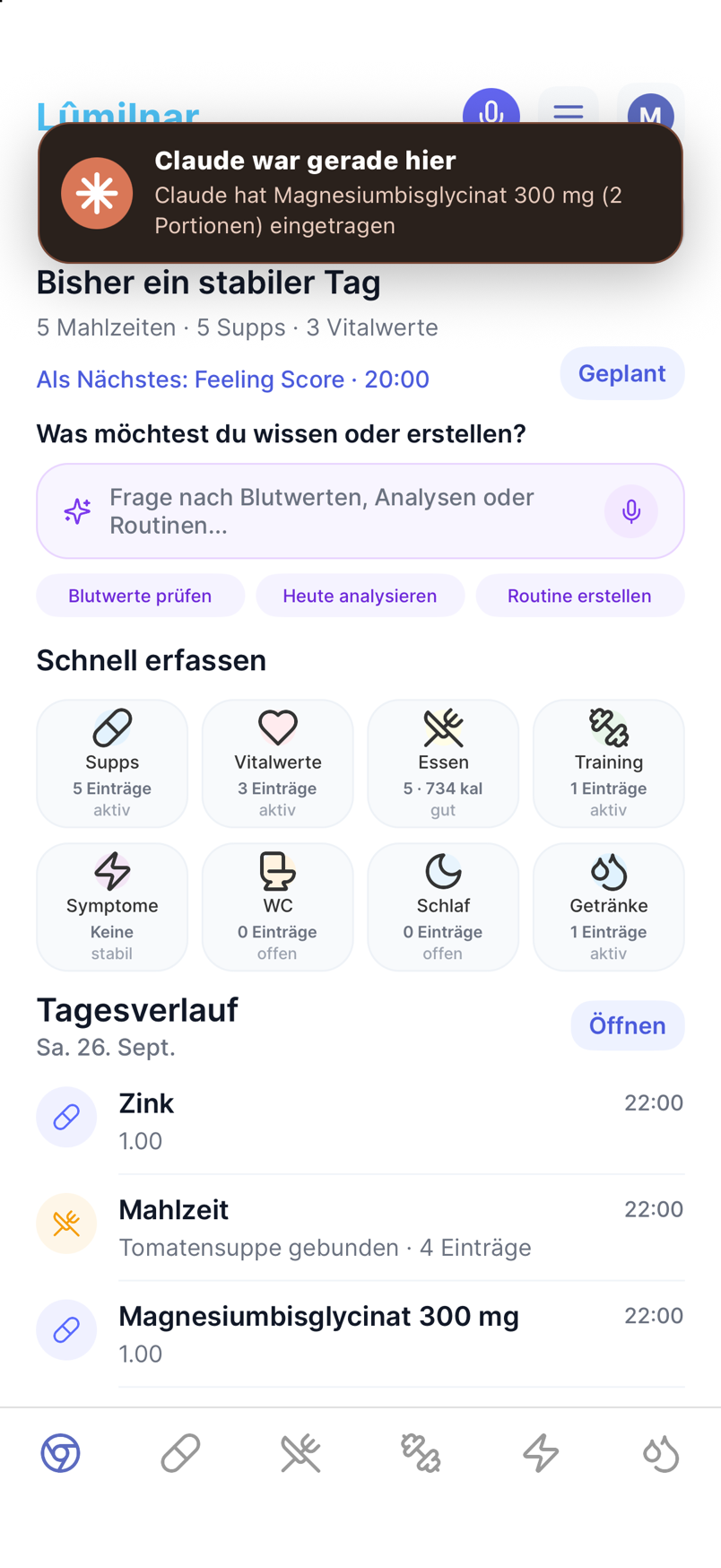
- Live popup in the app when Claude has created something
- Session notes: the coach remembers earlier conversations
How to connect Claude or ChatGPT
- 1
Enable the connector in the app
Under “Connect Claude & ChatGPT” in the settings you create a connection. You decide what may be read and what may be written.
- 2
Add it in Claude or ChatGPT
Lumilnar appears as a connector (MCP) in Claude and as a connection in ChatGPT. Sign in once, done – on every device where you use the chat.
- 3
Ask questions
“How was my sleep this week compared with my resting pulse?”, “Does zinc fit my blood panel?” – the chat fetches the data from the app and answers with values and dates.
- 4
Let it track
“Just took magnesium and ate an apple” – Claude logs it; named products are looked up online and created as a meal. Deletions and implausible values always ask first.
- 5
Popup in the app
Every action by Claude or ChatGPT shows up as a card in the app: “Claude logged zinc”, “Claude changed the evening routine”. One tap leads to the entry.

Lumi: the coach in the app
Lumi sits on the home screen and in every analysis. It sets you up at first start, answers questions about your data, explains analyses and creates routines and plans on request – as a draft you confirm. For questions about the day it uses meals, supplements, sleep and vitals; for questions about labs, the reports with history.

Coach philosophies
Not everyone wants the same advice. You choose the perspective the coach rates from: balanced Mediterranean, bioenergetic after Ray Peat, keto and carnivore, vegetarian or low-vitamin-A. The choice applies in the app and in Claude and ChatGPT alike – and the supplement deep dive gives your coach style’s verdict per product.

The connector: Claude and ChatGPT with your data
The connector is an MCP connection (Model Context Protocol). It gives Claude and ChatGPT tools: start a session (persona, goals, profile, supplement library, bloodwork, 60-day overview), fetch data per domain, Quick-Track, create supplements and meals, create and change routines, build weekly plans, save session notes.
- Honesty: the coach cites values with unit and date. What is not in your data, it says so.
- Safety: deletions need your confirmation; implausible or medically urgent values are not logged but reported back.
- Continuity: after every conversation the coach writes a short note; the next session and the in-app chat build on it.

Live popup: you see what Claude does
When Claude creates something, the app reports it immediately – whichever screen is open: “Claude logged raw apple (150 g)”, “Claude is creating Double Chickenburger via AI scan”. Lists refresh on their own. The message travels over a private channel only your account receives.
What Claude and ChatGPT see
Only what you release, and only in the conversation where you ask. The data stays in your database; the connector delivers excerpts on request. You can disconnect at any time in the app.
Frequently asked questions
Do I need a Claude or ChatGPT subscription?
For connectors Claude needs a plan with connector support; for ChatGPT it depends on the plan. Lumi in the app works regardless.
Can Claude delete data?
Only after explicit confirmation in the chat. Deletions are returned as a proposal and executed only after your “yes”.
Does Claude know my bloodwork?
If you allow it, yes: the list of reports, the latest values and the history of every marker. The coach cites values with dates.
Which language does the coach speak?
Yours. Lumi and the connector answer in the language you write in; labels and popups follow the app language.
What is an MCP connector?
A standard that lets AI assistants use tools and data of other services safely. Lumilnar provides read and write tools through it that Claude and ChatGPT call on your behalf.
Lumilnar is on the App Store – free during the open beta.
Get it on the App Store